
Automated Document Generation in SABSUSКак автоматическая генерация документов экономит время
Documents should not be copied by hand from orders, CRM, payments and inventory. SABSUS can create invoices, receipts, PDFs, confirmations, delivery notes and service reports from structured system data.Документы не должны вручную собираться из заказов, CRM, оплат и склада. SABSUS может создавать счета, чеки, PDF, подтверждения, delivery notes и service reports из структурированных данных системы.
Automated document generation means the business enters data once, then the system uses it everywhere: orders, CRM, POS, payments, delivery, inventory, service workflow and analytics. The document becomes part of the operating process, not a separate file in a folder.Автоматическая генерация документов означает, что бизнес вводит данные один раз, а система использует их везде: в заказах, CRM, POS, оплатах, доставке, складе, сервисном workflow и аналитике. Документ становится частью операционного процесса, а не отдельным файлом в папке.
Created from order, customer, items, tax, discount, due date and payment terms.Создается из заказа, клиента, позиций, налога, скидки, даты оплаты и условий.
Generated after payment and stored in customer and order history.Создается после оплаты и сохраняется в истории клиента и заказа.
Confirms order details, delivery, service date, status and contact data.Подтверждает детали заказа, доставку, дату услуги, статус и контакты.
Uses job data, employee notes, photos, checklist results and customer signature.Берет данные услуги, заметки сотрудника, фото, чек-лист и подпись клиента.
Why manual document creation slows businessПочему ручное создание документов замедляет бизнес
In many companies the same data is copied again and again: customer name, address, phone, order number, products, services, quantity, price, discount, tax, payment method and delivery notes. Every copy step creates delay and risk.Во многих компаниях одни и те же данные копируются снова и снова: имя клиента, адрес, телефон, номер заказа, товары, услуги, количество, цена, скидка, налог, способ оплаты и delivery instructions. Каждый ручной шаг добавляет задержку и риск ошибки.
What data should feed a documentКакие данные должны попадать в документ
A document is only reliable when it is generated from structured data. SABSUS can use customer, order, product, service, payment, delivery, branch, employee and template data so the document reflects the actual business process.Документ надежен только тогда, когда он создается из структурированных данных. SABSUS может использовать данные клиента, заказа, товаров, услуг, оплаты, доставки, филиала, сотрудника и шаблона, чтобы документ отражал реальный бизнес-процесс.
| Data sourceИсточник данных | What it fillsЧто заполняет |
|---|---|
| Customer and CRMКлиент и CRM | Name, phone, email, billing address, delivery address, company details and history.Имя, телефон, email, billing address, delivery address, реквизиты и историю. |
| Order and POSЗаказ и POS | Order number, products, services, quantity, prices, modifiers, bundles and comments.Номер заказа, товары, услуги, количество, цены, модификаторы, наборы и комментарии. |
| PaymentsОплаты | Paid amount, remaining balance, payment method, deposits, refund and transaction status.Оплаченную сумму, остаток, способ оплаты, депозиты, refund и статус транзакции. |
| Delivery and serviceДоставка и услуги | Route, instructions, service date, employee, checklist, photos and completion notes.Маршрут, инструкции, дату услуги, сотрудника, чек-лист, фото и заметки о выполнении. |
Document workflow in SABSUSWorkflow генерации документов в SABSUS
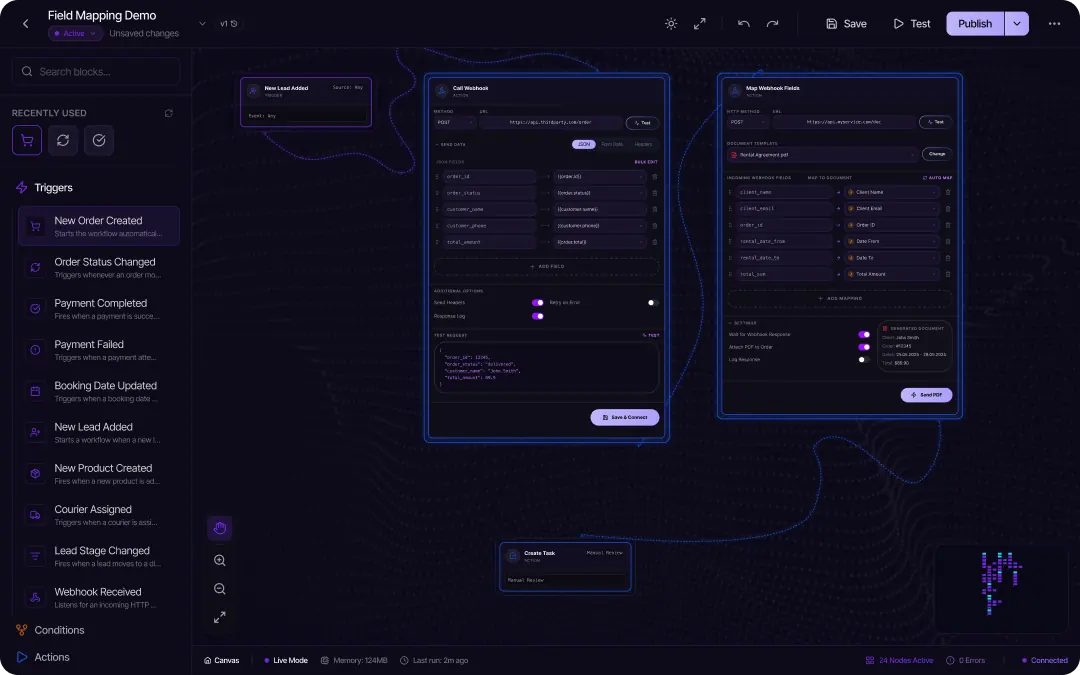
The practical workflow is simple: the business records the real operation, and SABSUS turns the data into the correct document at the right moment.Практический workflow простой: бизнес фиксирует реальную операцию, а SABSUS превращает данные в нужный документ в нужный момент.
Lead, call, online order, app order or staff-created order.Лид, звонок, online order, app order или заказ от сотрудника.
Customer, order, products, price, tax, payment and delivery.Клиент, заказ, товары, цена, налог, оплата и доставка.
Invoice, receipt, quote, confirmation or service form.Invoice, receipt, quote, confirmation или service form.
SABSUS fills fields, applies brand and creates the file.SABSUS заполняет поля, применяет бренд и создает файл.
Email, SMS link, customer portal, app or internal workflow.Email, SMS link, customer portal, приложение или внутренний workflow.
Status, version, employee, date and related order stay saved.Статус, версия, сотрудник, дата и связанный заказ сохраняются.
Templates, versions and permissionsШаблоны, версии и права доступа
Automation does not mean every employee can edit every document. A good system separates templates, generated documents and user permissions. The owner controls brand, required fields, language, legal blocks and status rules.Автоматизация не означает, что каждый сотрудник может менять любой документ. Хорошая система разделяет шаблоны, готовые документы и права пользователей. Владелец контролирует бренд, обязательные поля, язык, юридические блоки и правила статусов.
Logo, layout, fields, terms, language, signature blocks and required notes.Логотип, layout, поля, условия, язык, подписи и обязательные заметки.
If an order changes, the business can see which version was sent or replaced.Если заказ изменился, бизнес видит, какая версия была отправлена или заменена.
Staff can generate allowed documents without editing financial or legal templates.Сотрудники создают разрешенные документы без изменения финансовых или юридических шаблонов.
Documents by business typeДокументы для разных типов бизнеса
Receipts, order confirmations, delivery notes, refund documents and shift reports.Чеки, подтверждения заказов, delivery notes, refund documents и сменные отчеты.
Quotes, work orders, service reports, invoices, payment confirmations and agreements.Quotes, work orders, service reports, счета, подтверждения оплат и agreements.
Receipts, invoices, return forms, delivery documents, internal transfers and stock reports.Чеки, invoices, формы возврата, delivery documents, перемещения и складские отчеты.
Quotes, invoices, packing slips, delivery notes, purchase documents and account statements.Quotes, invoices, packing slips, delivery notes, закупочные документы и statements.
Route documents, checklists, customer sign-off, photos and completion reports.Route documents, чек-листы, подписи клиентов, фото и отчеты о выполнении.
Standard templates, branch-specific details, shared rules and local document history.Стандартные шаблоны, данные филиалов, общие правила и локальная история документов.
AI can help, but the data model matters firstAI помогает, но сначала важна модель данных
AI can draft wording, translate customer messages, summarize a service report or suggest a response. But AI works best when the system already has clean structured data. Without customer, order, payment and inventory data, AI only writes text around incomplete information.AI может подготовить текст, перевести сообщение клиенту, кратко описать service report или предложить ответ. Но AI работает лучше, когда в системе уже есть чистые структурированные данные. Без данных клиента, заказа, оплаты и склада AI просто пишет текст вокруг неполной информации.
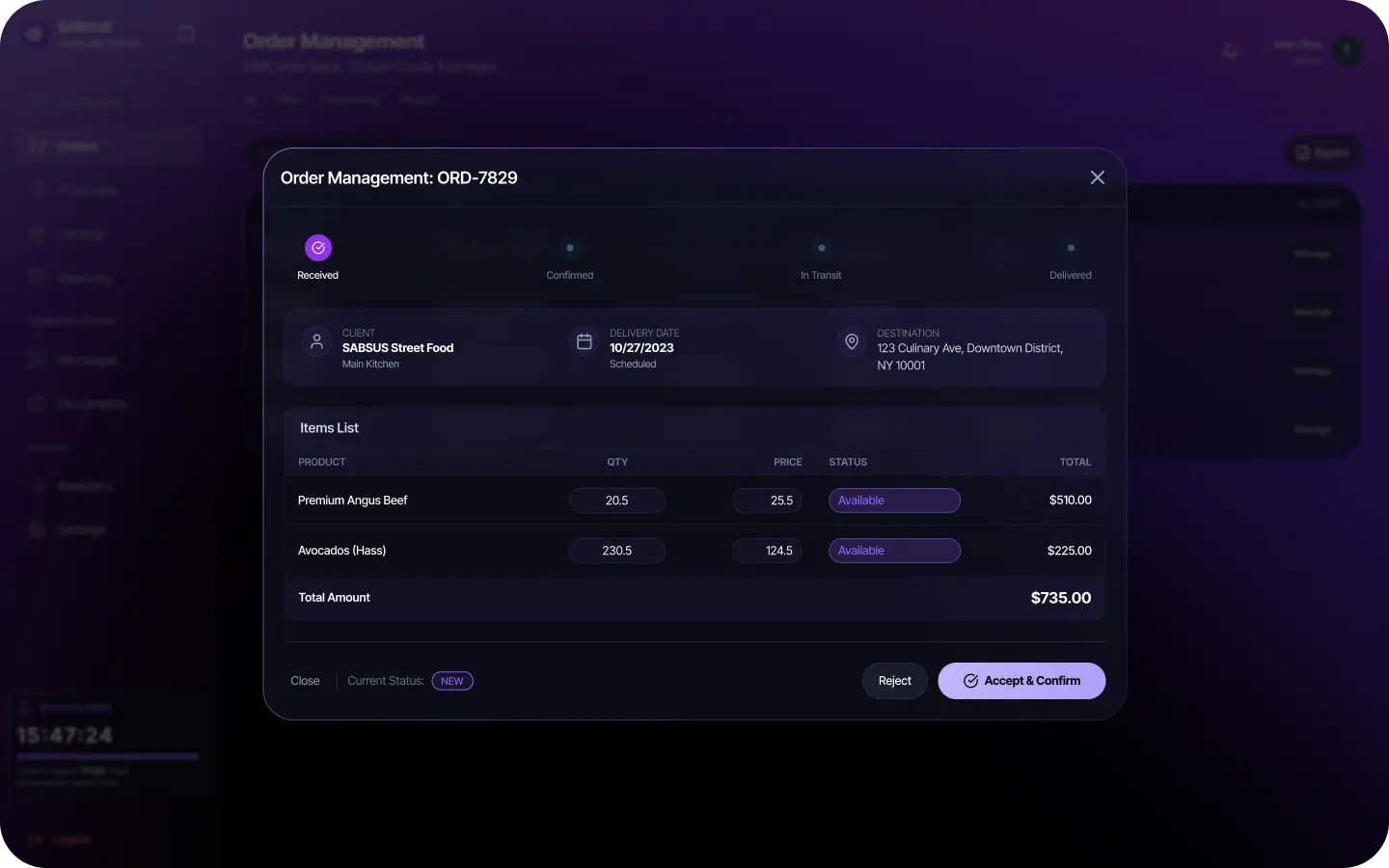
Common document automation mistakesЧастые ошибки в автоматизации документов
How to start automating documentsКак начать автоматизировать документы
Start with the documents that appear most often and create the most manual work. Then map every field back to the system data that should fill it.Начинать стоит с документов, которые создаются чаще всего и отнимают больше всего ручного времени. Затем нужно связать каждое поле с данными системы, которые должны его заполнять.
Invoice, receipt, order confirmation, quote, delivery note and service report.Invoice, receipt, order confirmation, quote, delivery note и service report.
Required fields, template owner, versioning, sending status and order history link.Обязательные поля, владелец шаблона, версии, статус отправки и связь с заказом.
Bottom lineИтог
Automated document generation saves time because employees stop copying data between orders, CRM, POS, payments, inventory and PDF templates. SABSUS helps turn documents into a controlled workflow where invoices, receipts, confirmations, delivery notes, service reports and customer files are created from the business process itself.Автоматическая генерация документов экономит время, потому что сотрудники перестают вручную копировать данные между заказами, CRM, POS, оплатами, складом и PDF-шаблонами. SABSUS помогает превратить документы в контролируемый workflow, где счета, чеки, подтверждения, delivery notes, service reports и клиентские файлы создаются из самого бизнес-процесса.
Automated document generation FAQFAQ: автоматическая генерация документов
What is automated document generation?Что такое автоматическая генерация документов?
It is a process where the system creates documents from existing customer, order, payment, product, service, delivery, employee and company data.Это процесс, где система создает документы из уже существующих данных клиента, заказа, оплаты, товаров, услуг, доставки, сотрудника и компании.
Which documents can be generated automatically?Какие документы можно генерировать автоматически?
Invoices, receipts, PDFs, quotes, order confirmations, delivery notes, service reports, contracts, internal forms, supplier documents and customer documents.Можно создавать invoices, receipts, PDFs, quotes, order confirmations, delivery notes, service reports, contracts, internal forms, supplier documents и customer documents.
How does document automation save time?Как генерация документов экономит время?
Employees no longer copy data from CRM, POS, orders, payments and inventory into separate templates. The system builds the document automatically.Сотрудники больше не копируют данные из CRM, POS, заказов, оплат и склада в отдельные шаблоны. Система собирает документ автоматически.
How does automation reduce document errors?Как автоматизация документов снижает ошибки?
The document uses system data, so there is less risk of mistakes in customer name, amount, tax, address, product list, quantity or terms.Документ берет данные из системы, поэтому меньше риск ошибиться в имени клиента, сумме, налоге, адресе, списке товаров, количестве или условиях.
Why should documents be linked with orders?Почему документы должны быть связаны с заказами?
The order contains key data: customer, products, amount, payment, status, delivery and employee. The document should stay inside order history.Заказ содержит ключевые данные: клиента, товары, сумму, оплату, статус, доставку и сотрудника. Документ должен оставаться в истории заказа.
Do automated documents still need templates?Нужны ли шаблоны для автоматической генерации?
Yes. Templates define visual style, fields, brand, language, terms, structure and required document blocks.Да. Шаблоны определяют внешний вид, поля, бренд, язык, условия, структуру и обязательные блоки документа.
How are documents connected with payments?Как документы связаны с оплатами?
An invoice can wait for payment, a receipt is created after payment, a refund document records a refund, and a payment confirmation confirms a transaction.Invoice может ожидать оплату, receipt создается после оплаты, refund document фиксирует возврат, а payment confirmation подтверждает транзакцию.
Is document automation useful for service companies?Подходит ли генерация документов для сервисного бизнеса?
Yes. Service companies can create service reports, quotes, invoices, agreements, forms and payment confirmations from service, customer and employee data.Да. Сервисные компании могут создавать service reports, quotes, invoices, agreements, forms и payment confirmations из данных услуги, клиента и сотрудника.
What should be controlled in document automation?Что важно контролировать в document automation?
Template versions, required fields, permissions, sending status, change history and the link between each document and its order or customer.Версии шаблонов, обязательные поля, права доступа, статус отправки, историю изменений и связь документа с заказом или клиентом.
How does SABSUS help with documents?Как SABSUS помогает с документами?
SABSUS connects documents with orders, CRM, POS, payments, inventory, delivery, service workflow, staff, analytics and AI automation in one operating platform.SABSUS связывает документы с заказами, CRM, POS, оплатами, складом, доставкой, услугами, сотрудниками, аналитикой и AI-автоматизацией в одной операционной платформе.